- Too little capability leaves your team doing the handoff work.
- Too much autonomy gives the agent room to make mistakes before anyone can stop them.
The Missing Distinction in AI Agents
Listing AI agent types as one category creates confusion.- Some agent types explain decision logic: how the agent decides what to do next.
- Others explain workflow behavior: how much work the agent can carry across tools, steps, and review points.
A Practical Framework for Choosing AI Agents
Before choosing an AI agent type, score the workflow across four dimensions.| Dimension | Ask This | Why It Matters |
| Context | Does the agent need memory, history, or state? | Decides whether simple rules are enough |
| Tools | Does it need browsers, files, APIs, code, or apps? | Decides whether tool access matters |
| Judgment | Does it need ranking, comparison, or trade-offs? | Decides whether utility logic matters |
| Risk | Can a bad action harm customers, money, security, or reputation? | Decides whether human review is required |
The Spectrum of Agent Control
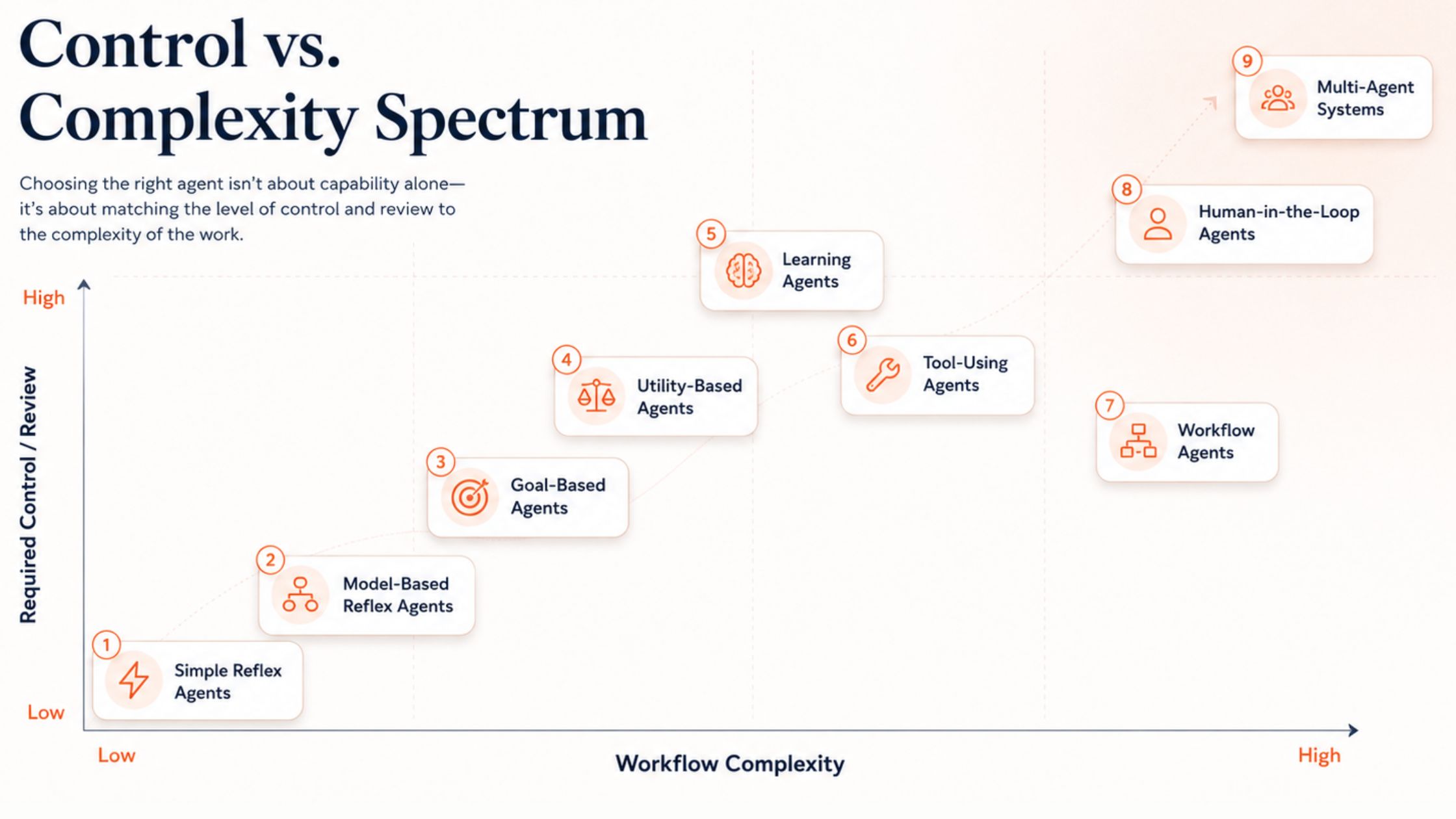
5 Classic AI Agent Types: How Agents Decide
1. Simple Reflex Agents
Simple reflex agents are stateless. They look at the current input only, then follow a fixed rule: if this happens, do that. They don’t remember past interactions, compare options, or adjust to context. That works when the task is predictable and low-risk, such as tagging tickets, routing forms, sending reminders, or triggering alerts. The problem starts when the context decides the right action. A message with “pricing” may come from a new buyer asking about plans. That belongs with sales. The same word may come from an angry customer saying, “Your pricing changed without notice.” That belongs with support or account management.2. Model-Based Reflex Agents
When the rule alone isn't enough, model-based reflex agents add context. They’re stateful, which means they check what is already known before acting. A complaint from a high-value customer with three recent tickets may need escalation. The same complaint from a new free user may go to the normal support queue. They work well for support routing, CRM updates, account alerts, and workflow status checks. Their strength is good context. Their weakness is bad context. If the stored information is missing or outdated, the agent may route the task based on the wrong assumption.3. Goal-Based Agents
Context tells the agent what situation it’s in. A goal tells it what outcome to reach. Goal-based agents work toward a defined outcome. They decide what to do next by checking whether each step moves the work closer to that outcome. For example, the goal may be: Find 20 U.S. B2B SaaS companies with 11 to 50 employees, recent hiring signals, and a likely need for workflow automation. The agent can search, compare, filter, and refine until the result matches the defined criteria. But weak goals produce weak execution. “Find good leads” is weak. “Find companies matching this ICP, showing this signal, and backed by this proof” gives the agent a clear target to achieve.4. Utility-Based Agents
Once the goal is clear, the next question is which path is worth taking. Utility-based agents choose between options by weighing trade-offs. Several choices may reach the goal, but each one carries a different mix of upside, cost, effort, and risk. For instance, a startup may receive five inbound demo requests in one day. One comes from a funded SaaS company with 80 employees, a matching tech stack, and a clear workflow pain. Another comes from a smaller company with a weak fit and no buying signal. A utility-based agent can score each request by company size, funding signal, use-case fit, tech stack match, urgency, and expected deal value. The point isn't to find the loudest lead. It's to find the one most worth acting on first. However, if you don’t have well-defined criteria, the agent can prioritize the wrong outcome. This shape works for demo prioritization, vendor selection, candidate ranking, refund review, account prioritization, and support triage.5. Learning Agents
Utility-based agents need a scorecard. Learning agents improve that scorecard over time. They use feedback from past results, data, or repeated use. For example, a lead qualification agent may score 100 accounts. Sales later marks 15 as strong fits, 40 as weak fits, and 45 as irrelevant. Over time, that feedback helps the agent spot which signals predict useful leads. But a learning agent is only as useful as the feedback loop behind it. Bad feedback, weak data, or no review loop can train the agent toward the wrong outcome. Learning agents make sense when the system can see what worked, what failed, and adjust future decisions.4 Modern AI Agent Types: How Agents Carry Work
6. Tool-Using Agents
The previous types explain how agents decide. Tool-using agents show how agents reach outside the chat to get work done. They can search the web, read files, query databases, run code, call APIs, update CRMs, edit spreadsheets, or work across business apps. They matter when the task needs live data, private records, source proof, or action in another system. For example, a financial compliance agent may pull invoice data from an ERP, read an invoice PDF, check the live exchange rate, compare the amount, and flag any variance above 0.5% for review. Their value isn't tool access alone. It's knowing which source to check, what to extract, and how to turn that evidence into a usable output. Their risk comes from access. If the goal is vague, the source is weak, or the agent acts inside business systems without approval, a small mistake can create real damage.7. Workflow Agents
Tool access is only the first step. Workflow agents matter when the same work needs to run again without rebuilding the process each time. They keep the path clear: what to check, what order to follow, what evidence to save, and what output to prepare. For example, a competitor monitoring workflow may check the same pricing pages every Monday, capture changes, save source links, and prepare a short update for review. Their strength is continuity. Their weakness is continuity, too. A weak process doesn’t fail once. It repeats. Use them when the task is recurring, structured, and reviewable. Avoid them when the process is still unclear.8. Human-in-the-Loop Agents
As workflows carry more steps, approval becomes a vital part of the design. Human-in-the-loop agents automate parts of the work but pause for human judgment at important moments. The agent can research, summarize, compare, and draft. The human approves the final action. It can draft a customer email, prepare a vendor shortlist, build a lead list, or write a report. The human reviews the work before it goes out, gets selected, or reaches a client. This model keeps humans where judgment matters most. The agent carries the busy work. The human owns the decision. This is the safer choice when the cost of a wrong decision is higher than the time saved by full automation.9. Multi-Agent Systems
Some workflows need more than approval. They need separate roles, so one agent doesn’tot carry the whole job. Multi-agent systems split the work into roles, so one agent doesn’tot have to carry planning, research, analysis, writing, and review alone. In a market research workflow, one agent may collect sources, a second may identify patterns, a third may write the brief, and a final agent may review the output. The structure mirrors a real team: smaller roles, cleaner focus, clearer review points. That specialization is the benefit these systems offer. The risk is coordination. If one agent makes a weak call, that mistake can become the next agent’s starting point. A research agent may accept a weak source, the analysis agent may build a confident conclusion from it, and the writing agent may turn that flawed conclusion into a polished report. This is a cascading error: the mistake doesn’tot stay in one step. It spreads. Agents may do the same task twice, skip important handoffs, or disagree on the next step. For most teams, one well-scoped agent is the safer starting point. Add more agents only when the work truly needs separate roles.Where Moclaw Fits in the AI Agent Map
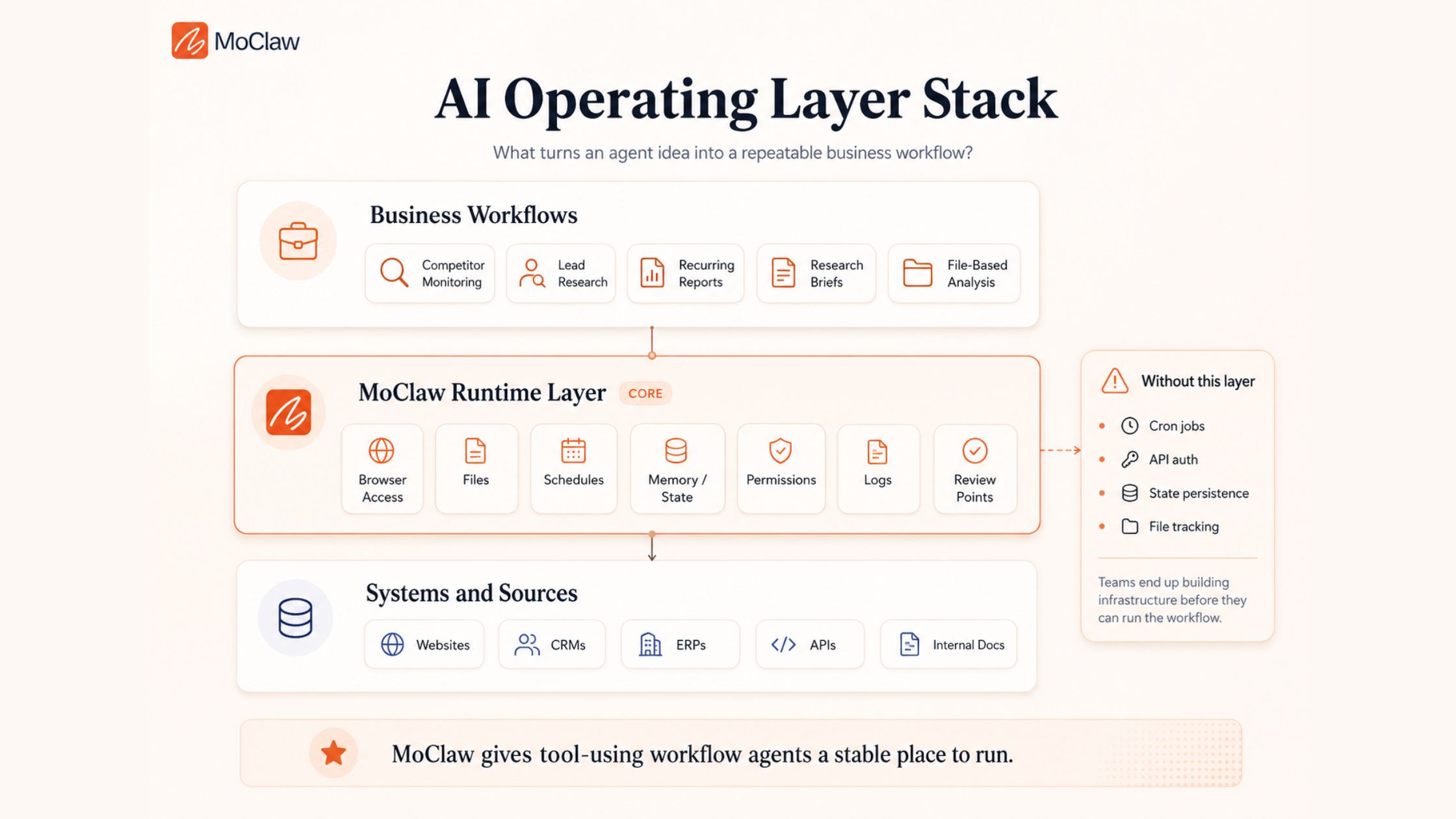
The Wrong-Agent Problem
An agent can be powerful and still be wrong for the job. Most failures start there: the workflow needs one agent shape, but the team chooses another.| Task to Automate | Wrong Choice | What Breaks | Better Choice |
| Weekly competitor monitoring | Chatbot | User restarts the work every week | Scheduled tool-using workflow agent |
| Lead qualification | Simple rules | Misses context and buying signals | Utility-based tool agent |
| Support replies | Fully autonomous agent | Risky customer-facing mistakes | Human-in-the-loop context agent |
| Market research | Multi-agent system | Too much overhead | Single goal-based tool agent |
| Data tagging | Custom agent framework | Overbuilt for simple logic | Simple reflex automation |
AI Agent Types by Business Workflow
The same agent type doesn’tot fit every workflow. Match the agent to the pressure inside the work: trigger, context, tools, judgment, repetition, or risk.| Agent Type | Quick Example | Business Workflow | Why It Fits | Human Review? |
| Simple Reflex Agent | Auto-responder | Email routing | Clear trigger, fixed action | Usually no |
| Model-Based Reflex Agent | Inventory tracker | Stock reordering | Needs current context | Sometimes |
| Utility-Based Agent | RFP Scorer | Deal qualification | Compares trade-offs | Yes |
| Learning Agent | Recommendation tuner | Lead scoring | Improves from feedback | Yes, early on |
| Tool-Using Agent | Invoice auditor | Compliance checks | Needs files, APIs, live data | Review output |
| Workflow Agent | Onboarding bot | Customer onboarding | Follows repeatable steps | Review the setup first |
| Goal-Based Agent | Route optimizer | Delivery planning | Works toward a target | Sometimes |
| Human-in-the-Loop Agent | Draft assistant | Customer replies | Needs approval | Yes |
| Multi-Agent System | AI agency | Product launch research | Needs divided roles | Yes |