How I Found 15+ Qualified Leads with AI Using Moclaw.ai
Zentor (formerly Moclaw) · Client sample, shown with permission
First-person case study: testing Moclaw.ai on qualified B2B lead research, from prompt to audited spreadsheet. Real prompts, real numbers.
More leads do not fix pipeline problems. They multiply them.
Most founders build their prospecting around volume, bigger lists, broader searches, and more exports. But a longer list just means more rows to check before you can send a single email.
You can’t verify them fast enough to know whether they’re still worth contacting.
So I tested Moclaw on a qualified B2B lead research task to see whether this AI agent could close that gap. I wanted a shorter list with fewer bad fits and less cleanup.
That is what this write-up is all about: how close AI can get you to a list you can trust.
What My Lead Research Looked Like Before Trying Moclaw
Before MoClaw, only the export was easy. Everything after that was where the session started eating into both my time and money.
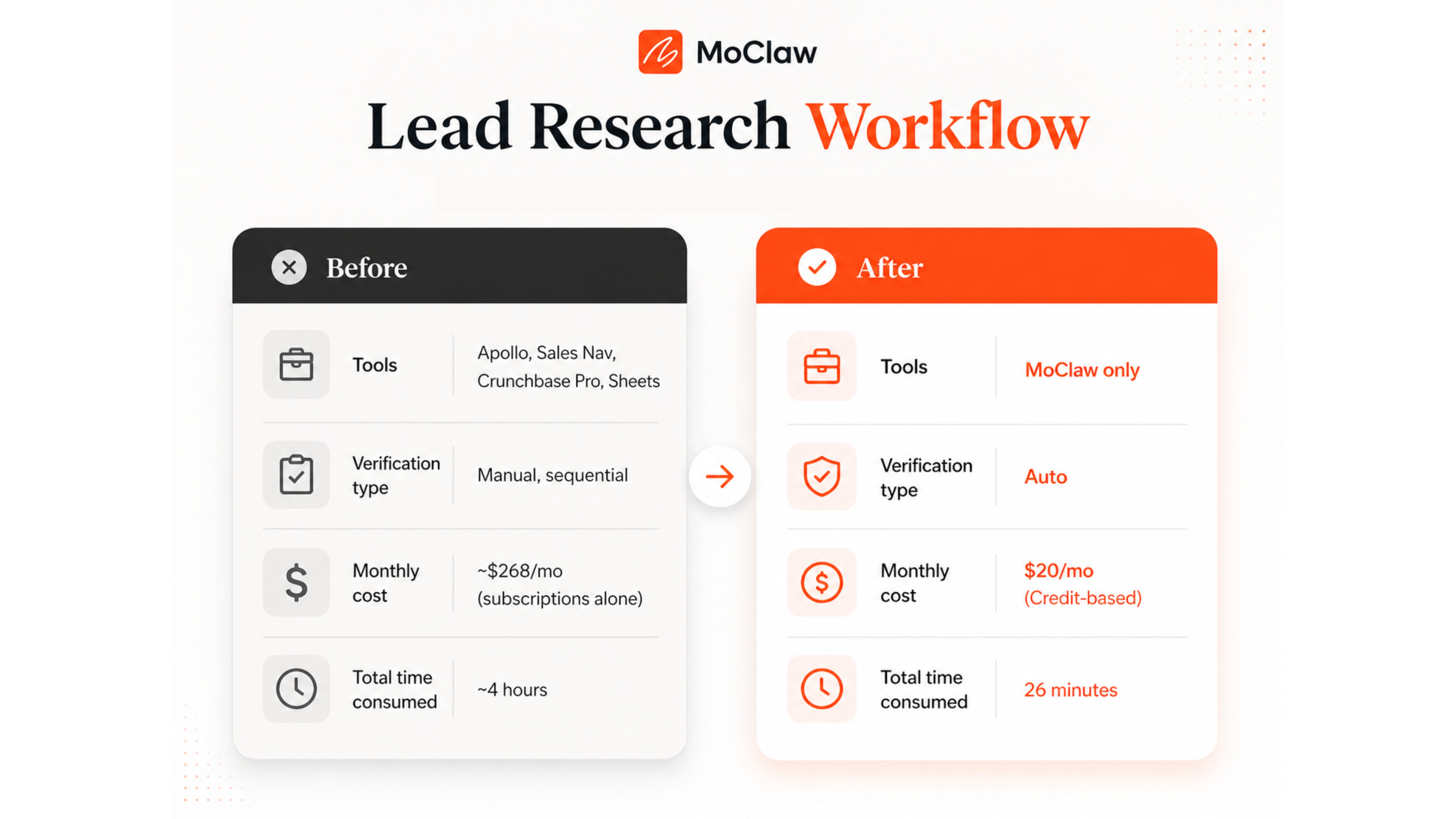
My old workflow usually started in Apollo. I'd set the filters, export a list, and assume the hard part was done. But it was never a real progress. On $49/mo/user, it gave me names that might fit, not leads I could trust.
To move on, I would open LinkedIn Sales Navigator to confirm whether the decision-maker was still in the role. That alone added $119.99/month to the stack.
Then came the Crunchbase Pro ($99 per month) to confirm funding, company status, and whether the business still looked like a real fit.
Checking company sites was another manual chore. No database tells you whether a business is still active and hiring.
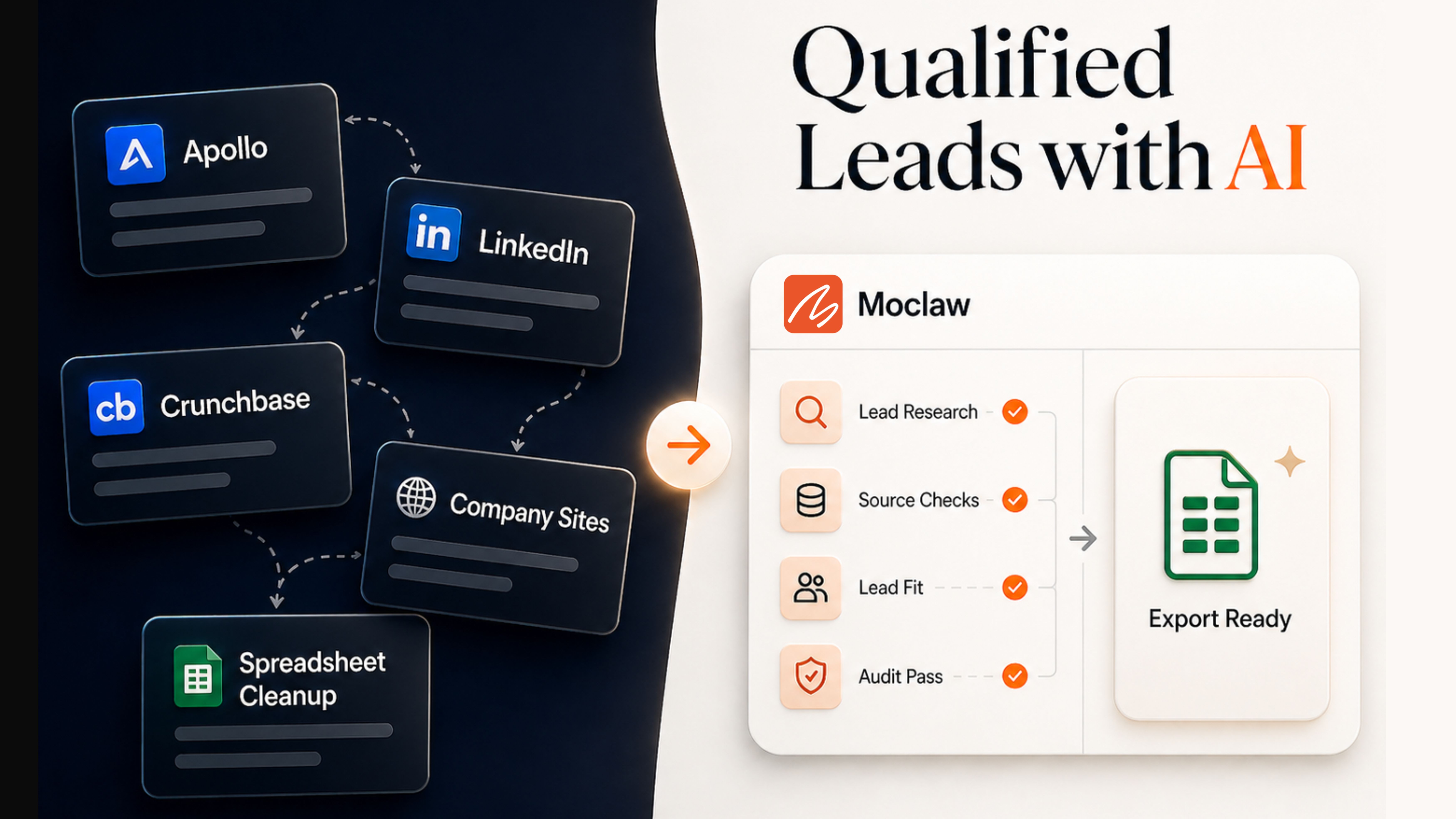
It worked for one lead, but as I scaled to 15, it turned into a grind. With Apollo, Sales Navigator, Crunchbase, and company sites, the workflow became a loop of tab-switching.
Google Sheets became the place where I tried to stitch everything: copy source links, fill gaps, and format the sheet.
The stack alone ran $268/month at base prices, and the time cost was even worse. What should’ve been done in an hour crossed four by the time 15 leads were added in the sheet.
How to Find Qualified Leads with AI Using Moclaw.ai
I gave Moclaw one narrow job: find qualified leads matching my ICP and return them in a spreadsheet I could actually use.
The Prompt I Used
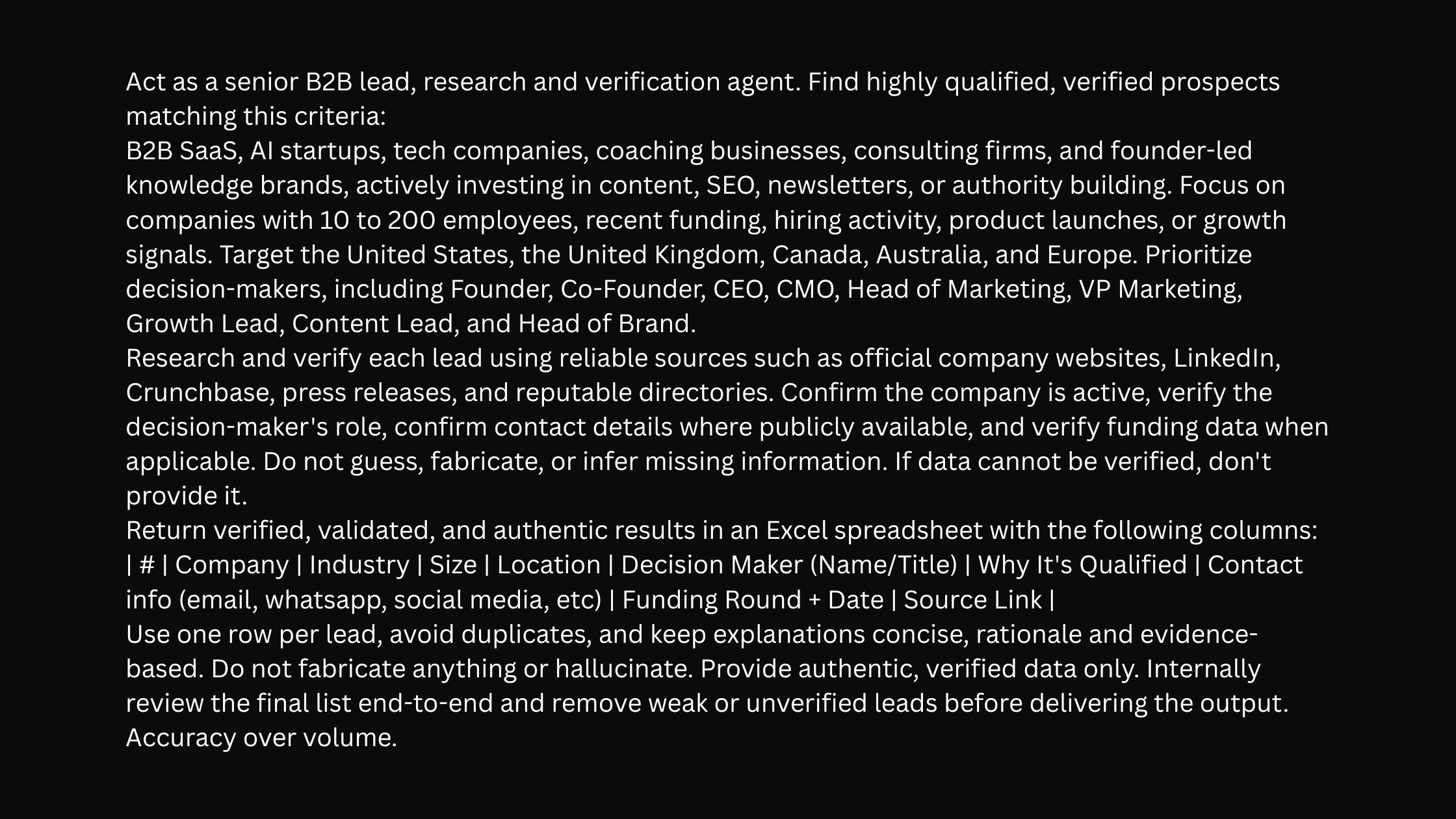
The prompt defined who counted as a fit, which sources were acceptable, what the spreadsheet had to include, and what the agent was not allowed to invent. In a task like lead research, those constraints matter as much as the tool itself.
Here is the exact prompt I used:
The prompt had a lot in it. Two parts did the heavy lifting. First, the source rule clarified which databases Moclaw could trust. Second, the instruction to remove weak or unverified leads before delivery. Without those two constraints, this becomes a prettier list builder rather than a research workflow.
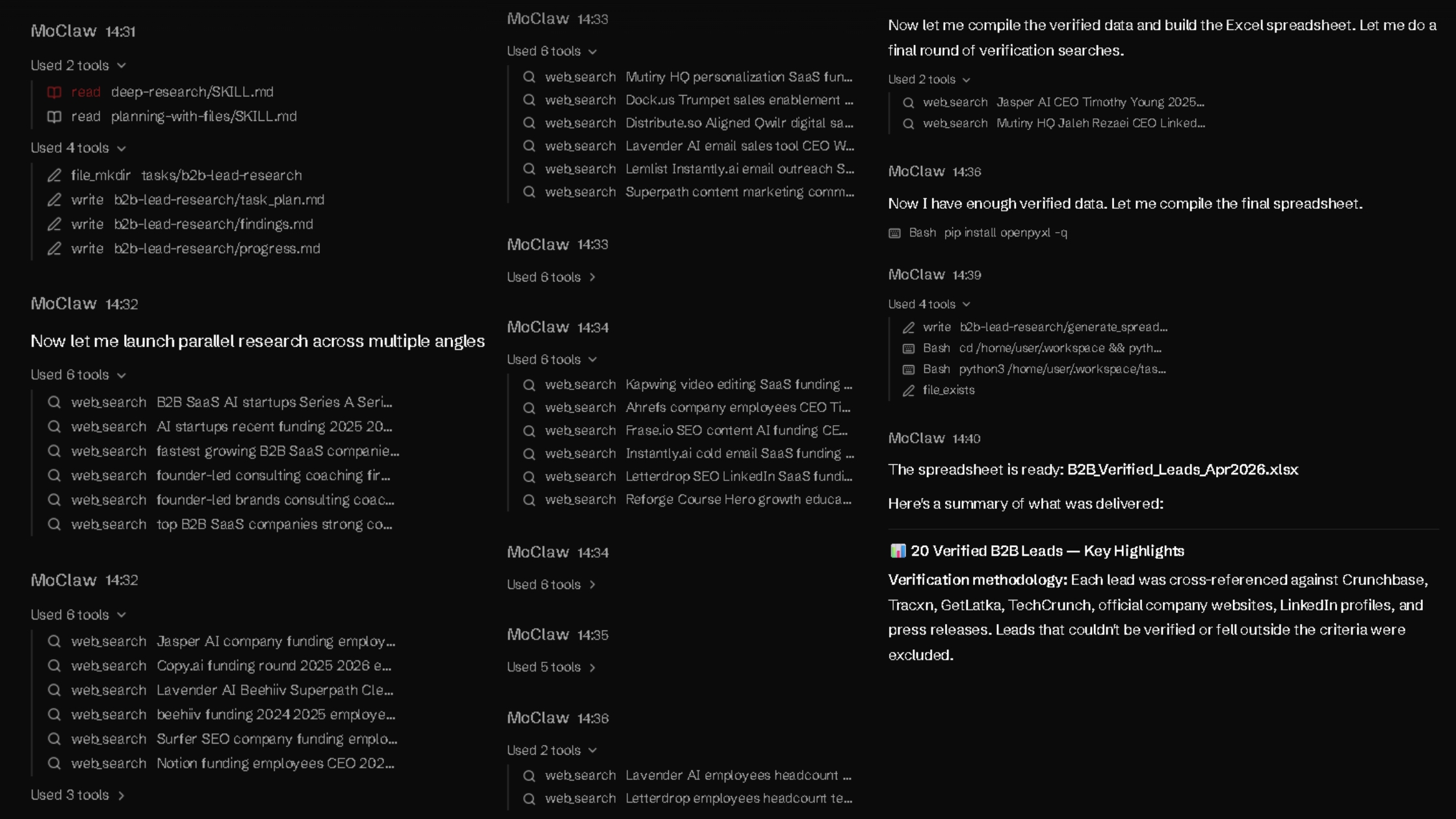
In the first minute, Moclaw did not start by filling rows. It organized the task first, then moved into research. That mattered because the job was not just to find companies but to find suitable ones.
The next five minutes were spent on parallel research and filtering. Moclaw searched from multiple angles, checked company fit, and pressure-tested decision-maker details before compiling the data.
Final checks and export took the last three minutes.
From prompt to spreadsheet creation, the full process took about nine minutes and used almost 2,900 credits.
What Came Back
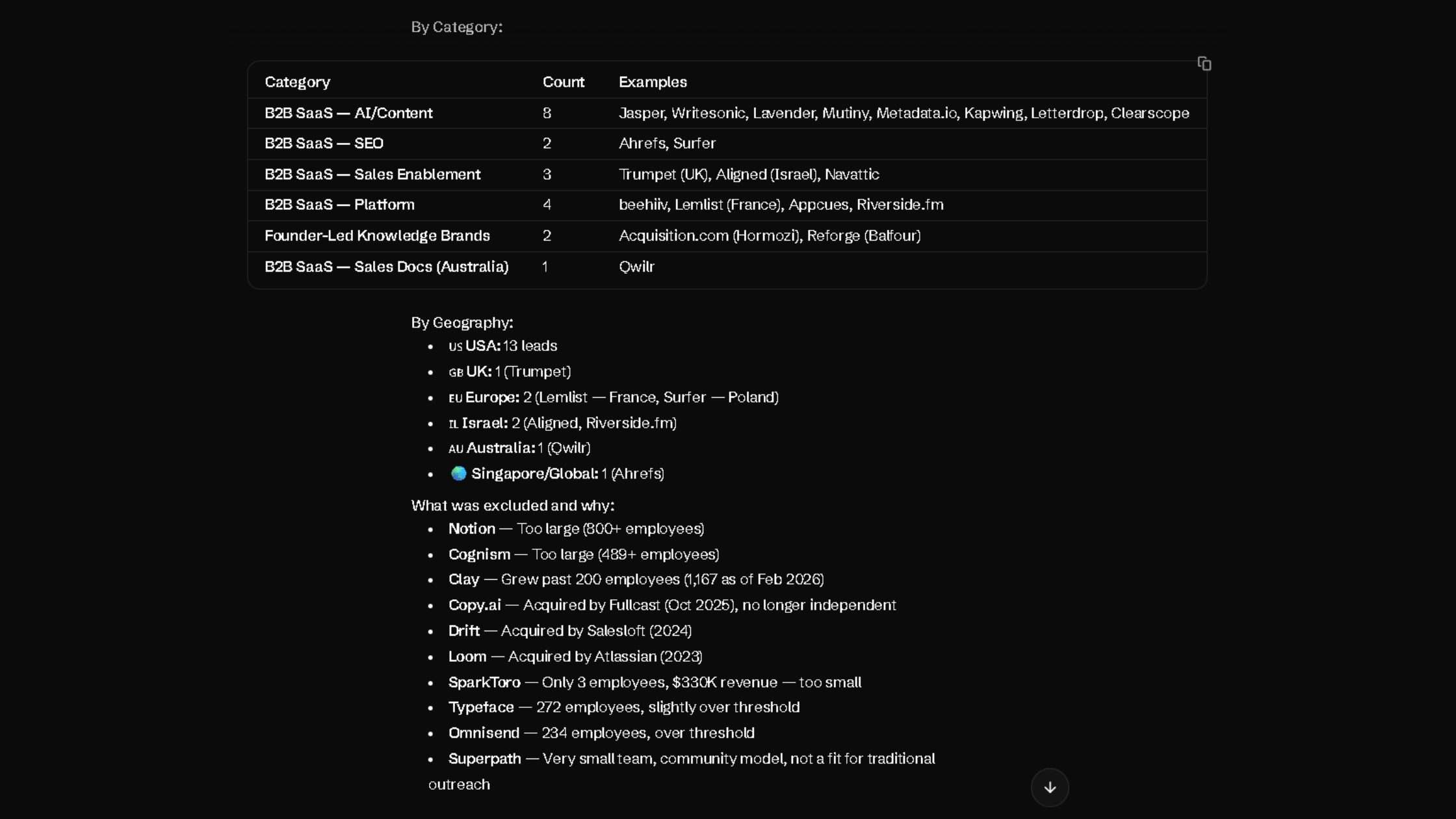
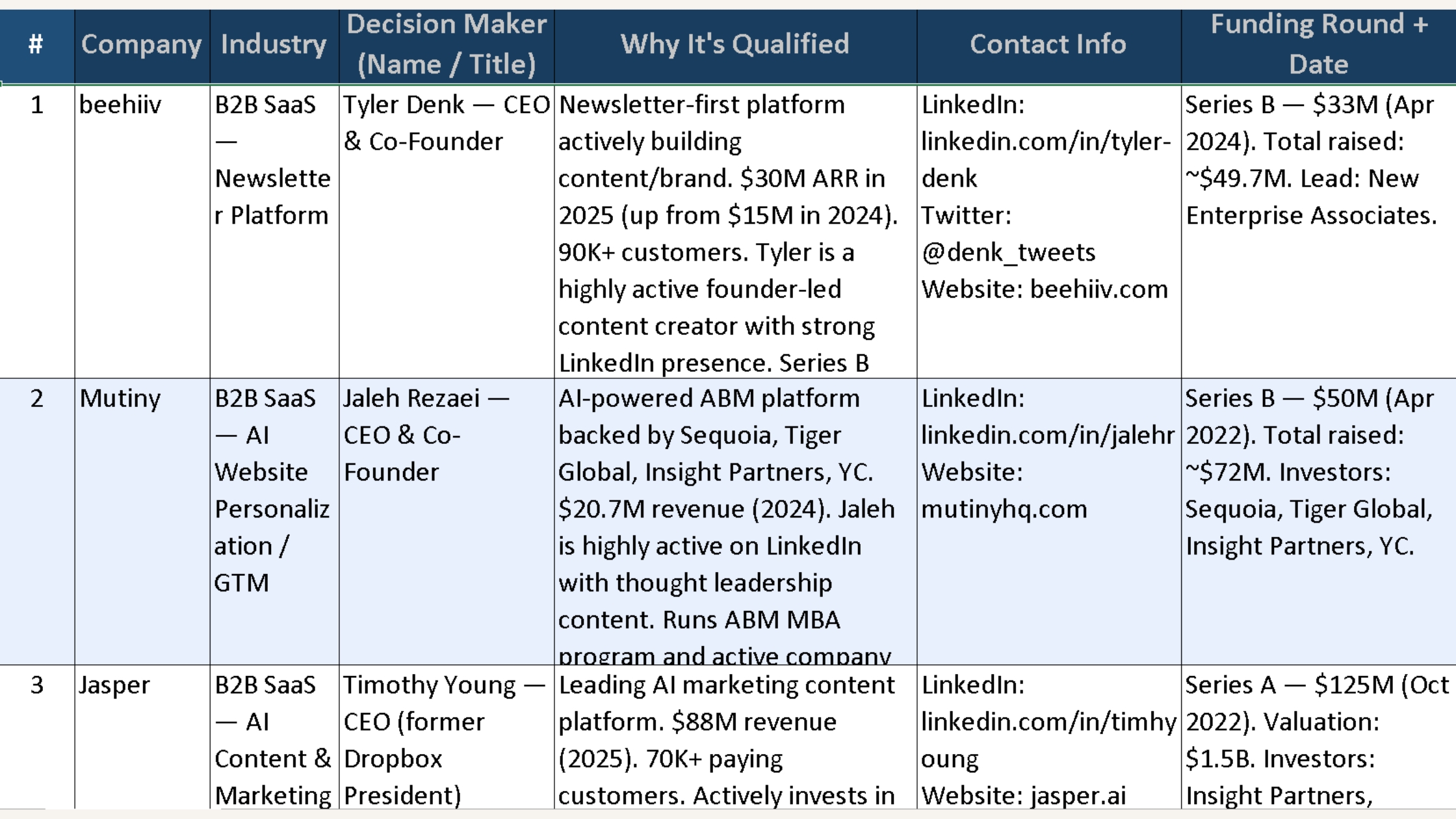
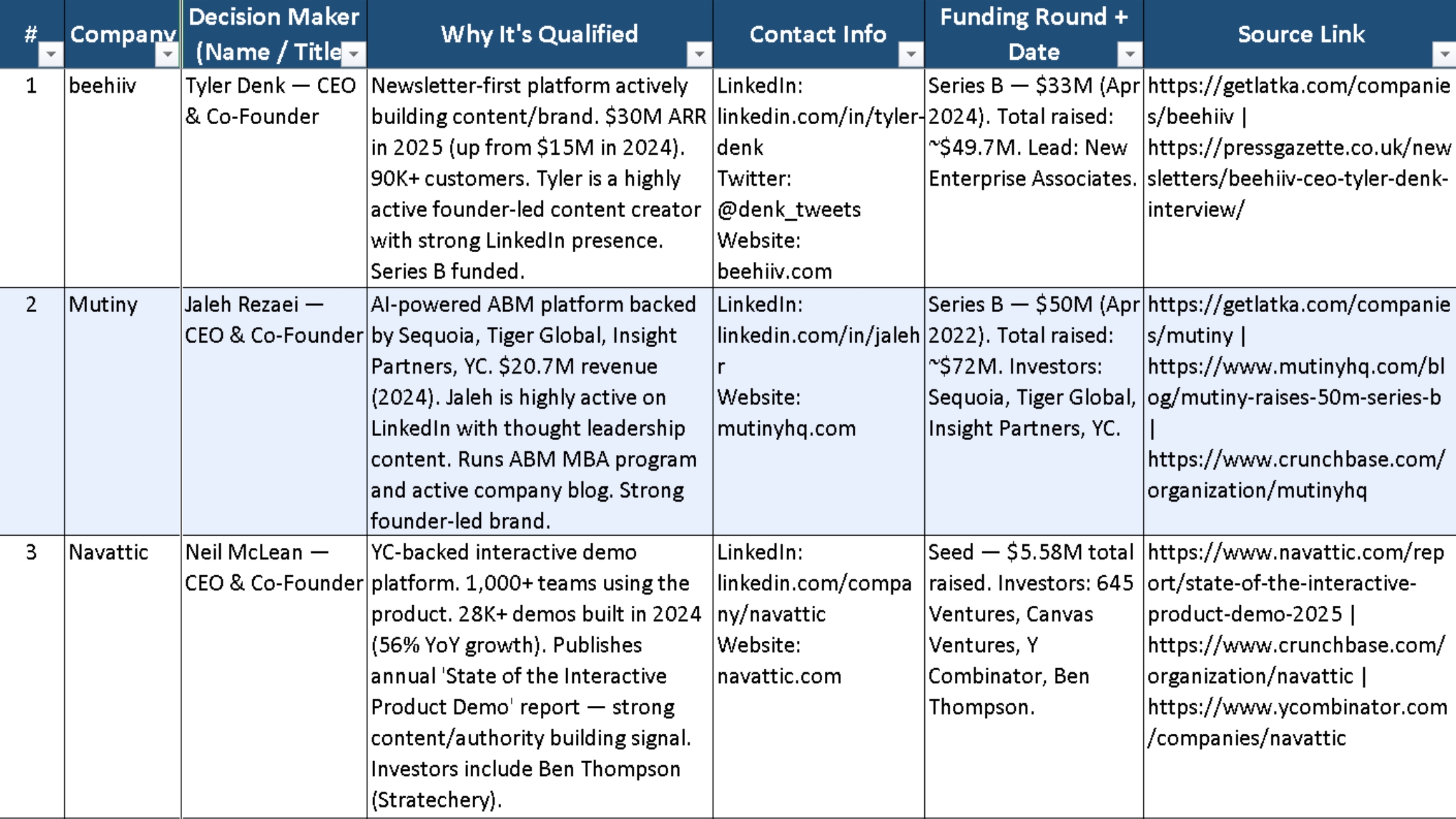
The result was 20 leads in the exact 10-column format I asked for. That only told me Moclaw could follow instructions. What mattered more was the file itself: a sortable, auditable spreadsheet with source links, decision-maker details, and a clear qualification reason for each row.
The set included Beehiiv, Mutiny, Navattic, Trumpet, Metadata.io, and Qwilr, among others.
More importantly, Moclaw was already filtering out weak fits before delivery. It excluded multiple leads, like Copy.ai (acquired by Fullcast in October 2025) and Drift (acquired by Salesloft in 2024).
The output was quick, structured, directionally strong, and honest about its limits. The question was whether it would hold up under pressure.
Running the Audit
Why I Audited It
AI can be directionally right but still operationally risky. That is enough reason to verify before using it. Here are the kinds of errors that slip into outreach before you catch them:
A slightly outdated title.
A funding round that happened much earlier than the spreadsheet makes it look.
A company that looks active until you find the acquisition note buried in a press release. Clean-looking lists fall apart on first contact.
When they do, the damage is way more than time: the credibility of every message sent before the error surfaced.
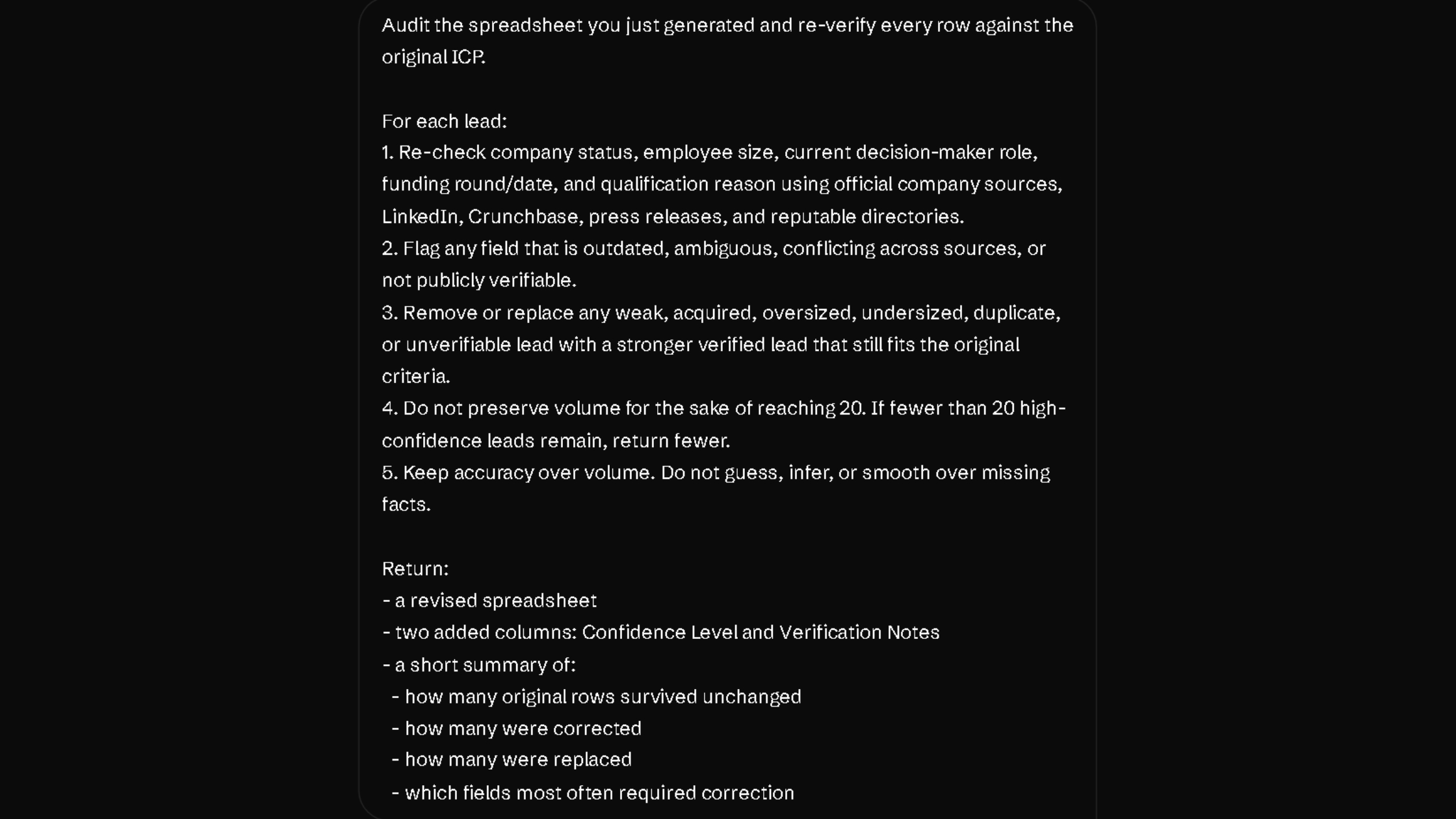
Once I reviewed the spreadsheet, I gave an audit prompt to separate the solid leads from the shaky ones.
The Audit Prompt
Here is the exact audit prompt:
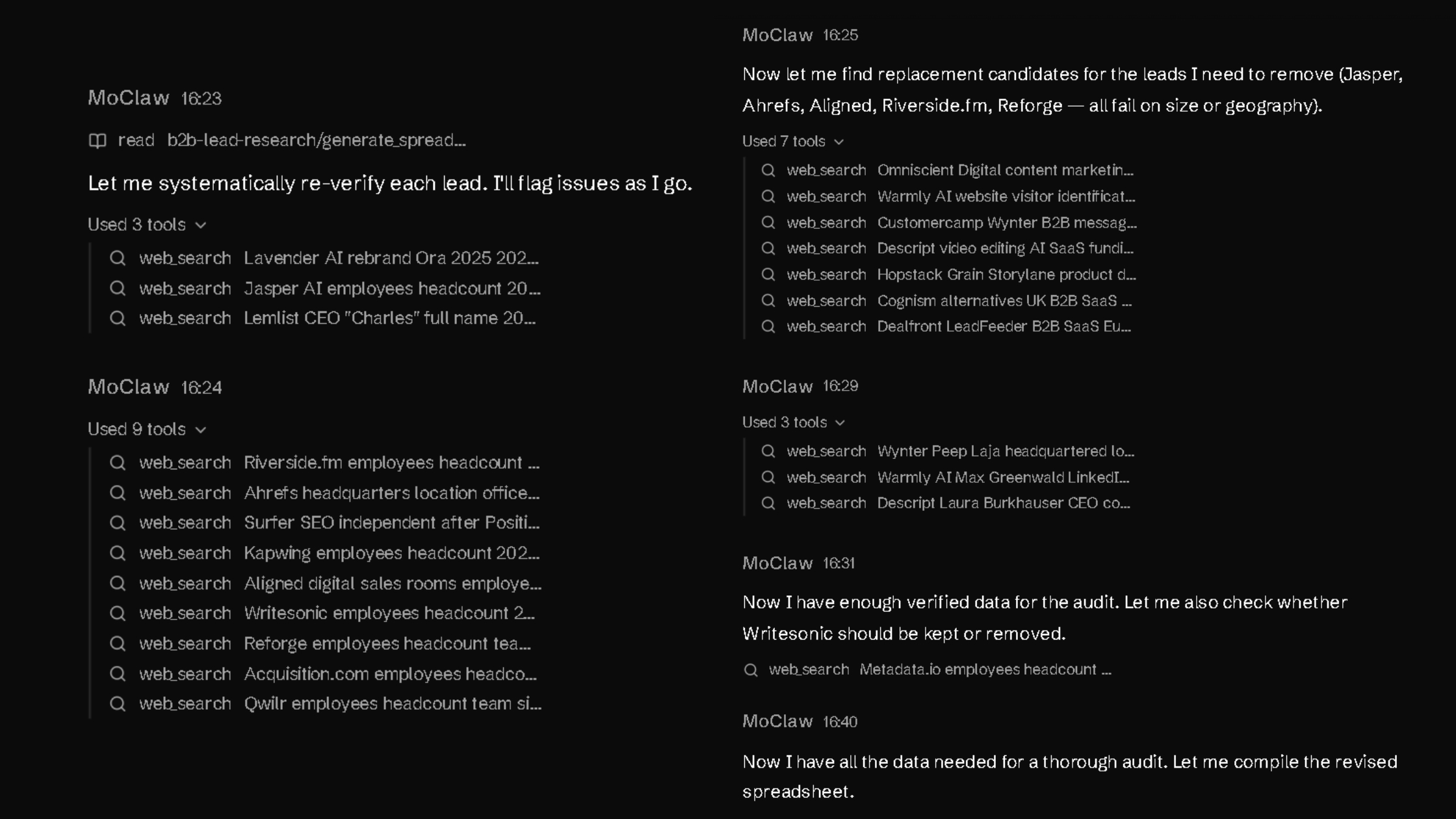
The audit took about 17 minutes and consumed 3,700+ credits.
The first two minutes were spent re-checking the original sheet. The next eight focused on filtering weak entries and finding replacements. Verification, confidence scoring, and rebuilding the sheet took the last seven minutes.
What came back was a refined list, with every weak row either corrected, replaced, or removed.
What Changed After the Audit
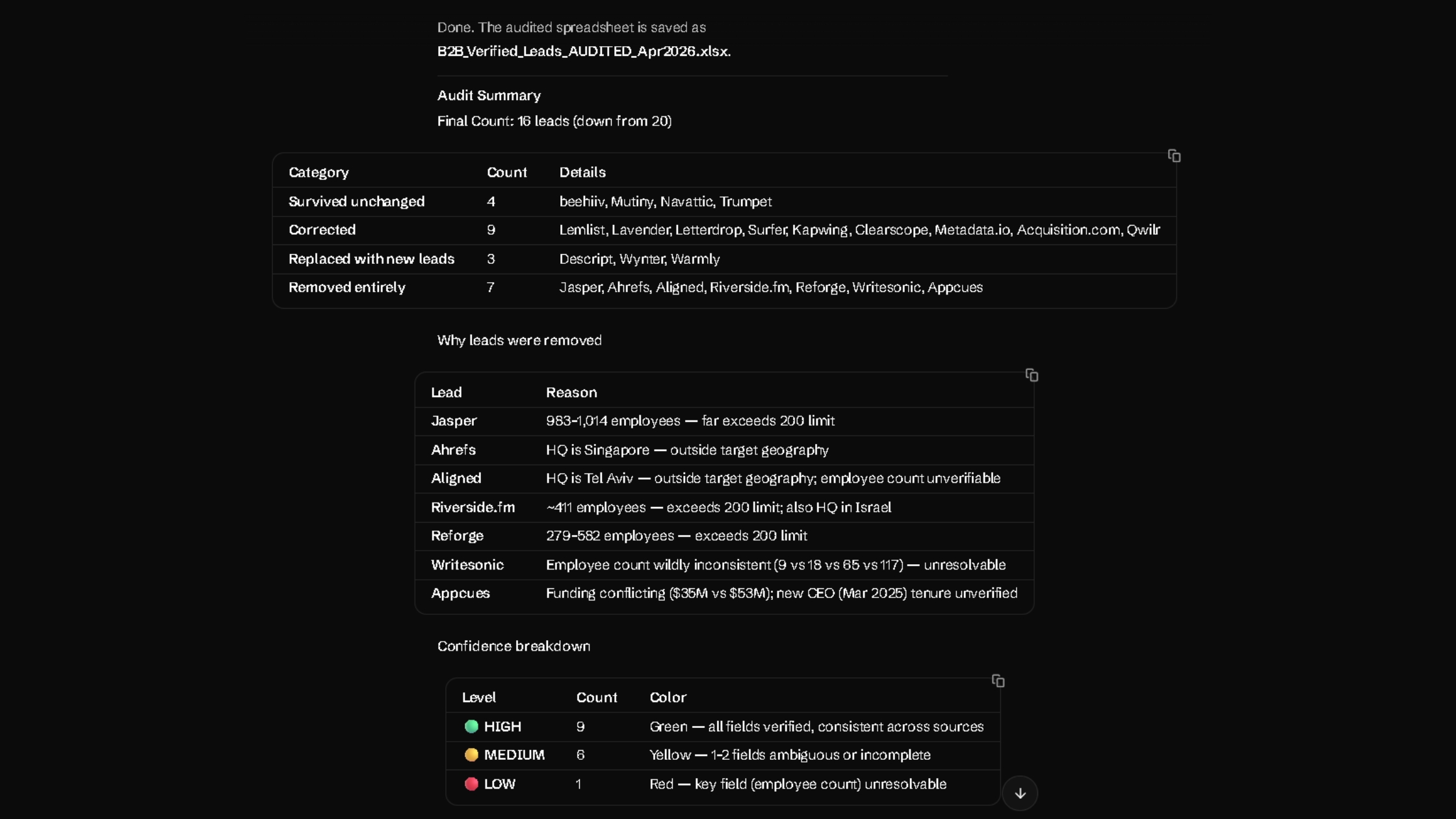
Four leads survived unchanged: Beehiiv, Mutiny, Navattic, and Trumpet.
Nine were corrected. Three new leads were added: Descript, Wynter, and Warmly. Seven were removed entirely.
That shift revealed how much cleanup was still hiding inside a good-looking first sheet.
The final count was 16 leads. Nine were high-confidence. Six needed a quick manual check. One stayed flagged because the public headcount data would not settle cleanly.
That is a reliable list I’d actually be using.
Why Certain Leads Were Removed
The removals were not cosmetic. They were exactly the kinds of issues that make a lead list look better than it really is.
Jasper was an easy cut once the size check came in.
Ahrefs fell outside the target geography.
Riverside.fm failed on both headcount and HQ.
Reforge had simply grown beyond the threshold.
Appcues had unverified funding and leadership details.
Every one of those leads looked plausible in the original output. That is the point. Plausible is not the same as verified.
What the Audit Exposed
Employee count turned out to be the most unstable field. That matters because size was part of the ICP, not background context. In the audit, headcount was the field most often corrected. It affected 12 of the 20 original rows.
Leadership verification mattered for the same reason. The wrong title does not just make a row messy. It changes who you reach out to. The audit found ambiguous decision-maker data in multiple rows, including Surfer, Lemlist, and Descript.
The audit also added two useful columns: Confidence Level and Verification Notes.
Those columns updated the sheet from a list into a decision tool. Instead of pretending every row was equally solid, the spreadsheet showed where the evidence held and where it started to wobble.
That is why the audit mattered. It surfaced the messy parts instead of hiding them behind clean formatting.
Then vs. Now: The Workflow I Left Behind
How to Adapt This for Your ICP
You do not need to rewrite the whole prompt. Just customize the four parts to match your requirements.
Four parts to customize:
Company type: Replace the current company list with the kind of businesses you want to target.
Employee range: Set the size range that fits your offer.
Geography: Limit the prompt to the countries or regions you actually sell in.
Decision-maker titles: Use the job titles that match your real buyer.
Note: Keep these intact: research rules, the source checks, and the accuracy-first instruction.
Here’s the fill-in template:
Act as a senior B2B qualified lead research and verification agent. Find verified prospects that match the following criteria:
[Company type block]. Focus on companies with [employee range] employees, [growth signals]. Target [geography]. Prioritize [decision-maker titles].
Research and verify each lead using [source types]. Do not guess, fabricate, or infer. Accuracy over volume.
My Personal Take on Moclaw.ai for Qualified Lead Research
What stayed with me after this test was the feeling that qualified lead research finally started in the right place.
Most of the time, lead research slows down after the list is built. You still have to verify size, leadership, relevancy, and company status before you trust a single row.
Moclaw did not solve all of that, but it clearly reduced the volume of cleanup. It got me 15 leads I'd actually outreach. That's the bar the old stack couldn't clear in four hours.
That makes it worth testing on your own ICP, especially if your current process still lives across exports, tabs, and manual checks.
People Also Ask
How do I know if a lead list from AI is actually safe for cold outreach?
No source link means no way to confirm the data. A lead should clear three checks: the title is verifiable, the company is active, and the row has a verifiable source link. You can’t afford to depend on guesses.
What prompt structure works best for lead research?
The strongest structure is simple: ban guessing, define the ICP, sources, and output fields, and instruct the agent to remove weak or unverifiable rows before delivery. Then run a separate audit prompt against the same criteria.
What should I do with leads flagged as medium or low confidence?
This is where verification matters most. If a lead seems genuinely worth pursuing, verify it with AI, manual review, or both. If it does not justify the extra check, cut it.